
JavaScript Package Managers
# Index
# Description
# Why Do We Need Package Managers?
# What Is NPM?
# What Is the NPM Registry?
# Common NPM Commands
# What Is NPX?
# Why Use NPX?
# What Is NVM?
# Common NVM Commands
# What Is Yarn?
# What Is PNPM?
# Why Is PNPM Faster?
# Comparing the Tools
# NPM vs Yarn vs PNPM
# Which One Should You Choose?
# Can They Be Used Together?
# Best Practices
# Description:
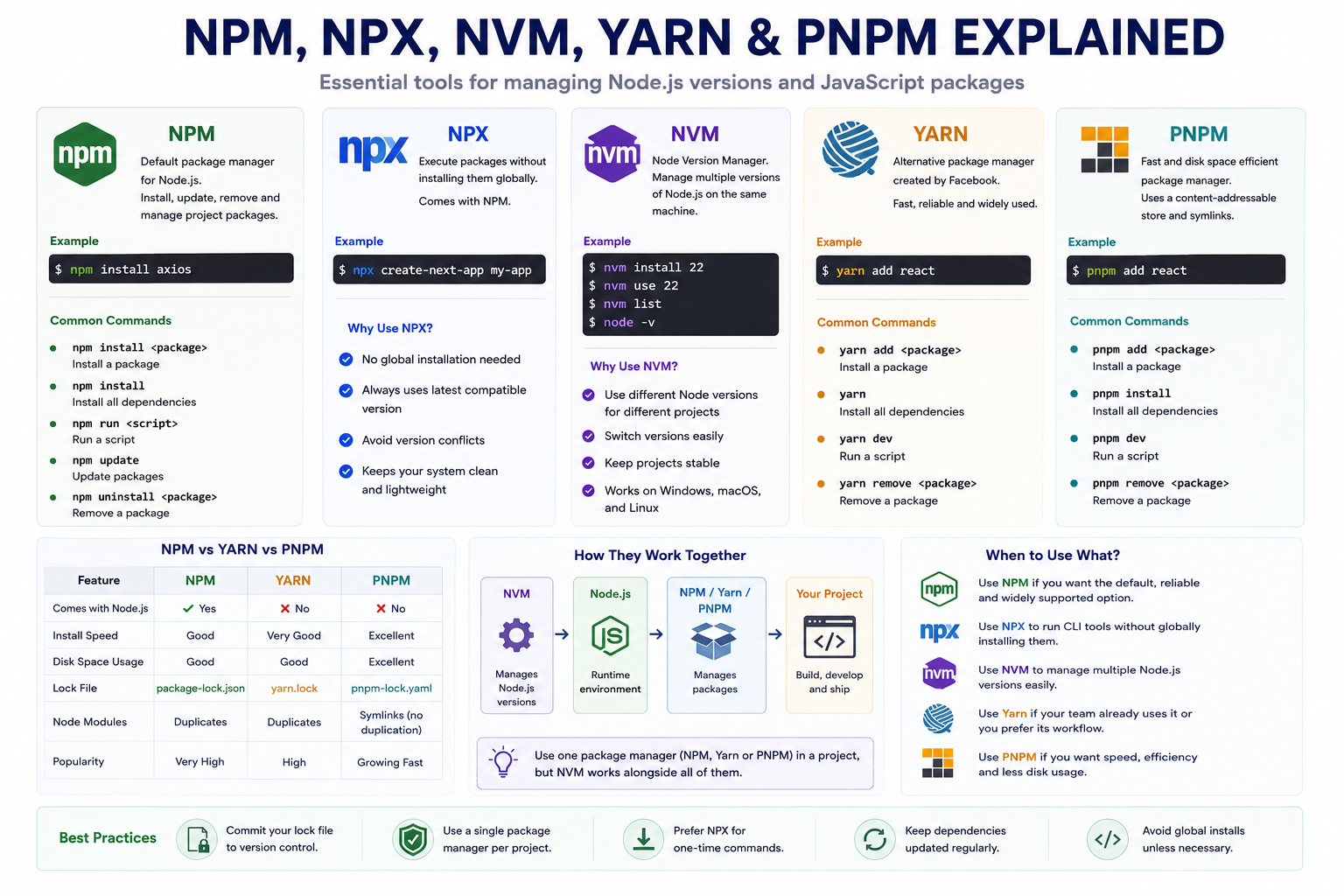
Modern JavaScript development relies heavily on external libraries and frameworks. Instead of writing every feature from scratch, developers use package managers to inst update, and manage reusable code. Tools such as NPM, NPX, NVM, Yarn, and PNPM simplify dependency management and improve the development workflow. Although they are often mentioned together, each serves a different purpose. This article explains what these tools are, how they differ, and when to use them.
# Why Do We Need Package Managers?
Imagine building a React application.
Instead of creating everything yourself, you might use libraries for:
- User interfaces
- Routing
- State management
- HTTP requests
- Form validation
- Testing
A package manager downloads and manages these libraries automatically.
Without package managers, developers would need to manually download and maintain every dependency.
# What Is NPM?
NPM (Node Package Manager) is the default package manager that comes bundled with Node.js.
It allows developers to:
- Install packages
- Remove packages
- Update packages
- Publish packages
- Manage project dependencies
Example: npm install react
This downloads React and adds it to your project.
# What Is the NPM Registry?
NPM uses a central online repository called the NPM Registry.
It contains millions of open-source packages published by developers worldwide.
Examples include:
- React
- Next.js
- Express
- TypeScript
- Axios
- ESLint
When you run an npm install command, the package is downloaded from the registry.
# Common NPM Commands
Install a package:
npm install axios
Install as a development dependency:
npm install --save-dev typescript
Install all project dependencies:
npm install
Update packages:
npm update
Remove a package:
npm uninstall axios
Run a script:
npm run dev
# What Is NPX?
NPX (Node Package Execute) is a command-line tool that comes with NPM.
It allows you to run packages without installing them globally.
Example:
npx create-next-app my-app
NPX downloads the required package temporarily (if needed), runs it, and then exits.
This keeps your system clean and ensures you use the latest version of many CLI tools.
# Why Use NPX?
Without NPX:
npm install -g create-next-app
With NPX:
npx create-next-app my-app
Benefits:
- No global installation required
- Always uses the latest compatible version
- Avoids version conflicts
- Keeps the system lightweight
# What Is NVM?
NVM (Node Version Manager) is a tool for managing multiple versions of Node.js on the same computer.
Different projects may require different Node.js versions.
Example: Project A, Node.js 18 & Project B: Node.js 22
NVM allows you to switch between them easily.
# Common NVM Commands
Install a Node.js version:
nvm install 22
List installed versions:
nvm list
Use a specific version:
nvm use 22
Check the active version:
node -v
NVM is especially useful for developers working on multiple projects.
# What Is Yarn?
Yarn is an alternative package manager originally developed by Meta (formerly Facebook).
It performs many of the same tasks as NPM while introducing improvements in speed, consistency, and dependency management.
Example, Install a package:
yarn add react
Install dependencies:
yarn
Run the development server:
yarn dev
Today, Yarn is widely used, especially in projects that adopted it before NPM introduced similar performance improvements.
# What Is PNPM?
PNPM (Performant Node Package Manager) is a modern package manager designed to be faster and more storage-efficient than traditional package managers.
Unlike NPM and Yarn, PNPM stores packages in a global content-addressable store and creates links to them instead of duplicating files for every project.
Example:
pnpm add react
Install dependencies:
pnpm install
Run the development server:
pnpm dev
# Why Is PNPM Faster?
Suppose you have ten React projects.
With traditional package managers:
Project 1
node_modules
Project 2
node_modules
Project 3
node_modules
Many packages are duplicated.
PNPM stores packages only once and creates links to them.
Benefits include:
- Less disk space
- Faster installations
- Reduced duplication
# Comparing the Tools
| Tool | Primary Purpose |
|---|---|
| NPM | Install and manage packages |
| NPX | Run packages without global installation |
| NVM | Manage multiple Node.js versions |
| Yarn | Alternative package manager |
| PNPM | Fast, space-efficient package manager |
# NPM vs Yarn vs PNPM
| Feature | NPM | Yarn | PNPM |
|---|---|---|---|
| Comes with Node.js | ✅ | ❌ | ❌ |
| Fast Installations | Good | Very Good | Excellent |
| Disk Space Efficiency | Good | Good | Excellent |
| Lock File | package-lock.json | yarn.lock | pnpm-lock.yaml |
| Widely Used | ✅ | ✅ | Growing rapidly |
All three install packages from the same NPM Registry.
# Which One Should You Choose?
For beginners:
NPM is a great starting point because it comes with Node.js and is supported by nearly every JavaScript project.
For modern projects focused on performance and efficient dependency management:
PNPM has become an increasingly popular choice.
Many large organizations and open-source projects have adopted PNPM because of its speed and reduced disk usage.
Yarn remains an excellent option, especially for teams already using it.
# Can They Be Used Together?
NVM works alongside package managers because it manages Node.js versions.
For example:
NVM > Node.js > NPM / Yarn / PNPM > Project
However, within a single project, it is generally best to use one package manager consistently to avoid multiple lock files and dependency inconsistencies.
# Best Practices
- Use NVM to manage Node.js versions.
- Use a single package manager per project.
- Commit your lock file (package-lock.json, yarn.lock, or pnpm-lock.yaml) to version control.
- Avoid installing packages globally unless necessary.
- Prefer NPX for running one-time CLI tools.
- Keep dependencies updated regularly.
Article Metadata:
Published Date: 2026-07-17
Updated Date: 2026-07-17
About the Author: Team absequ is a group of engineers and researchers working on real-world systems, software development, and technology solutions.