
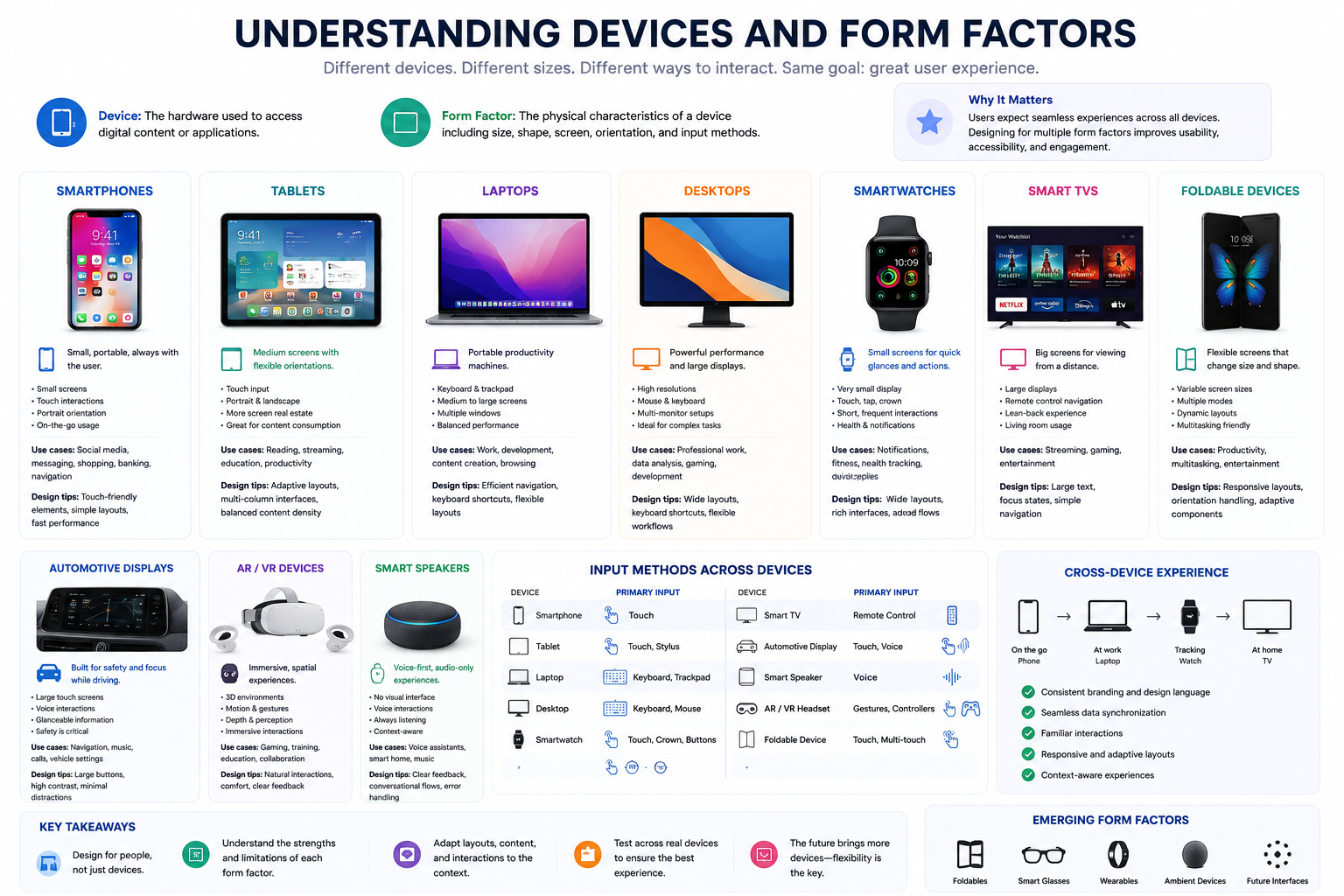
Understanding Devices and Form Factors
# Index
# Description
# What Are Devices and Form Factors?
# Why Do Form Factors Matter?
# Smartphones
# Tablets
# Laptops
# desktops
# Smartwatches
# Smart TVs
# Foldable Devices
# Automotive Displays
# AR and VR Devices
# Smart Speakers
# Input Methods Across Devices
# Cross-Device Experiences
# Responsive Design and Form Factors
# Future Form Factors
# Description:
Modern applications are no longer limited to desktop computers. Users interact with websites and applications across smartphones, tablets, laptops, smartwatches, televisions, automotive displays, and emerging technologies such as foldable devices and AR/VR systems. Each device introduces unique screen sizes, input methods, capabilities, and user expectations. Understanding these devices and their form factors is essential for building responsive, accessible, and user-friendly experiences.
# What Are Devices and Form Factors?
A device refers to the hardware used to access an application.
Examples include:
- Smartphones
- Tablets
- Laptops
- Desktops
- Smartwatches
- TVs
- Car displays
A form factor describes the physical characteristics of a device, including:
- Size
- Shape
- Screen dimensions
- Orientation
- Input methods
Different form factors influence how users interact with digital products.
# Why Do Form Factors Matter?
Users expect applications to work seamlessly regardless of the device they use.
For example, a banking application should provide:
- Easy navigation on phones.
- Efficient multitasking on desktops.
- Quick balance checks on smartwatches.
- Large controls for automotive displays.
Designing for multiple form factors improves:
- User experience
- Accessibility
- Performance
- Engagement
- Cross-device consistency
# Smartphones
Smartphones are the most widely used computing devices today.
Characteristics:
- Small screens
- Touch interactions
- Portrait orientation
- Limited screen space
Common use cases:
- Social media
- Messaging
- Shopping
- Navigation
- Banking
Design considerations:
- Touch-friendly buttons
- Minimal layouts
- Responsive design
- Fast loading times
# Tablets
Tablets offer larger screens and flexible orientations.
Characteristics:
- Touch input
- Portrait and landscape modes
- Medium-sized displays
Common use cases:
- Reading
- Entertainment
- Productivity
- Education
Design considerations:
- Adaptive layouts
- Larger content areas
- Multi-column interfaces
# Laptops
Laptops combine portability with productivity.
Characteristics:
- Keyboard and mouse
- Larger screens
- Multiple windows
Common use cases:
- Development
- Office work
- Content creation
- Web browsing
Design considerations:
- Efficient navigation
- Keyboard shortcuts
- Flexible layouts
# Desktops
Desktops provide powerful computing and large displays.
Characteristics:
- High resolutions
- Multiple monitors
- Precise pointer devices
Common use cases:
- Professional work
- Gaming
- Data analysis
- Software development
Design considerations:
- Wide layouts
- Rich interfaces
- Advanced workflows
# Smartwatches
Smartwatches prioritize quick interactions and glanceable information.
Characteristics:
- Very small screens
- Touch and rotating controls
- Short usage sessions
Common use cases:
- Notifications
- Health tracking
- Fitness monitoring
- Quick replies
Design considerations:
- Minimal content
- Large touch targets
- Simple interactions
# Smart TVs
Televisions are designed for viewing from a distance.
Characteristics:
- Large displays
- Remote control navigation
- Limited input options
Common use cases:
- Streaming
- Gaming
- Media consumption
Design considerations:
- Large text
- Focus indicators
- Simple navigation
Hover effects are generally less useful because TVs rely on directional navigation.
# Foldable Devices
Foldable devices support multiple screen configurations.
Characteristics:
- Variable screen sizes
- Dynamic layouts
- Multi-window capabilities
Common use cases:
- Productivity
- Entertainment
- Multitasking
Design considerations:
- Responsive layouts
- Orientation changes
- Flexible breakpoints
# Automotive Displays
Modern vehicles increasingly include digital interfaces.
Characteristics:
- Large touch screens
- Voice controls
- Driver safety constraints
Common use cases:
- Navigation
- Music playback
- Vehicle settings
Design considerations:
- Large buttons
- Minimal distractions
- Voice interactions
Safety should always take priority.
# AR and VR Devices
Augmented Reality (AR) and Virtual Reality (VR) introduce immersive experiences.
Characteristics:
- Spatial interfaces
- Motion tracking
- Gesture interactions
Common use cases:
- Gaming
- Training
- Education
- Collaboration
Design considerations:
- 3D environments
- Motion comfort
- Natural interactions
# Smart Speakers
Smart speakers primarily use voice interactions.
Characteristics:
- No visual interface
- Conversational interactions
Common use cases:
- Voice assistants
- Smart homes
- Music playback
Design considerations:
- Clear feedback
- Natural language support
- Error handling
# Input Methods Across Devices
Different devices support different input mechanisms.
| Device | Primary Input |
|---|---|
| Smartphone | Touch |
| Tablet | Touch, Stylus |
| Laptop | Keyboard, Mouse |
| Desktop | Keyboard, Mouse |
| Smartwatch | Touch, Crown |
| TV | Remote Control |
| Automotive Display | Touch, Voice |
| Smart Speaker | Voice |
| AR/VR Headset | Gestures, Controllers |
Applications should adapt to these interaction methods.
# Cross-Device Experiences
Users often switch between devices.
Example:
- Morning: Phone
- Work: Laptop
- Gym: Smartwatch
- Evening: Smart TV
Users expect seamless experiences across devices.
Modern applications should maintain:
- Consistent branding
- Familiar interactions
- Data synchronization
- Responsive layouts
# Responsive Design and Form Factors
Responsive design helps applications adapt to:
- Screen sizes
- Orientations
- Input methods
- Device capabilities
Instead of designing for specific devices, modern development focuses on creating flexible interfaces.
# Future Form Factors
Emerging technologies include:
- Foldables
- Smart glasses
- AR headsets
- VR environments
- Wearables
- Ambient computing devices
As technology evolves, interfaces must continue adapting to new ways people interact with digital systems.
Article Metadata:
Published Date: 2026-06-27
Updated Date: 2026-06-27
About the Author: Team absequ is a group of engineers and researchers working on real-world systems, software development, and technology solutions.